Capflow - AI Video Captions1.0.2
Publisher Description



Capflow - AI Video Captions
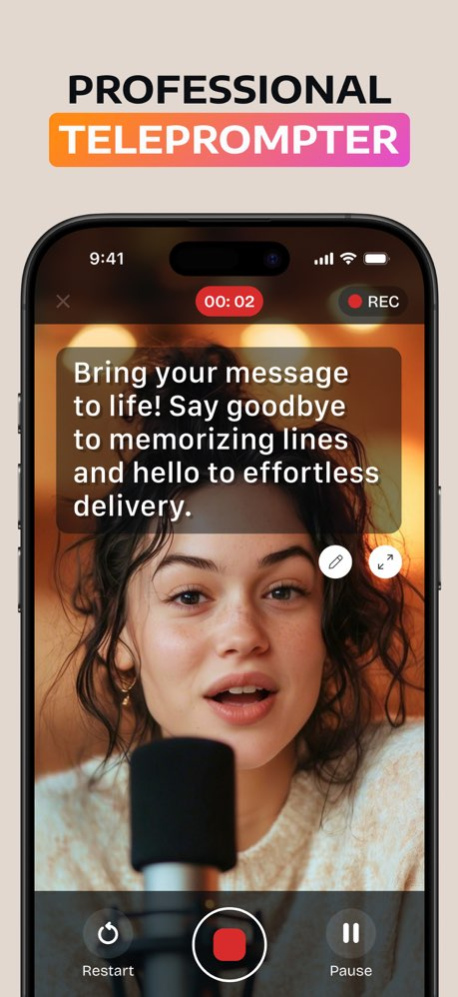
Create engaging videos with built-in captions and a smart teleprompter - all in one powerful app.
Capflow helps you record confidently while automatically generating captions for your videos. Follow your script with the integrated teleprompter and add professional video captions in seconds - no extra editing apps needed.
Whether you're creating Reels, YouTube videos, online courses, or business content, Capflow combines a smooth video teleprompter with automatic captions to make your content clear, accessible, and engaging.
Record & Add Captions with Ease
- Record videos while reading your script using the built-in teleprompter.
- Generate auto captions instantly and customize subtitles to match your style.
- Adjust scroll speed, text size, and caption formatting for perfect results.
Smart Tools for Creators
- AI Script Generator: Create or refine scripts optimized for on-camera delivery.
- Auto Captions & Subtitles: Add accurate captions automatically and edit subtitles with flexible font and color options.
- Caption Styling: Customize video captions for TikTok, Instagram, or YouTube.
For Every Creator
- Ideal for content creators, educators, entrepreneurs, coaches, and professionals.
- Capflow is a complete teleprompter and captions app designed to help you speak naturally while your captions enhance clarity and reach.
- Create, caption, and share your videos in just a few taps - everything you need to record and add captions is in one place.
Key Features
- Auto-scrolling video teleprompter
- Built-in video recording
- Automatic captions and smart subtitles
- Customizable caption styles and formatting
- AI-powered script assistant
- Adjustable scroll speed and countdown timer
Create Professional Videos with Captions
With Capflow - AI Video Captions, you can deliver your message smoothly while adding high-quality captions that boost engagement and accessibility. Record with confidence, add captions instantly, and publish polished videos anytime, anywhere.
Download Capflow - AI Video Captions now and start creating videos with professional captions today!
We offer auto-renewing subscriptions with the following pricing and terms:
- Subscriptions are available for 1 week, 1 month, or 12 months
- Payment will be charged to your iTunes Account at confirmation of purchase
- Your subscription will automatically renew unless auto-renew is turned off at least 24 hours before the end of the current period
- Your account will be charged for renewal within 24 hours prior to the end of the current period, and the cost of the renewal will be identified
- You can manage your subscription and turn off auto-renewal by going to your Account Settings after purchase
- Any unused portion of a free trial period, if offered, will be forfeited when you purchase a subscription
Prices may vary by region.
Privacy Policy: https://logicfusion.net/captions/pp
Terms of Use: https://logicfusion.net/captions/tou
Have feedback or suggestions? Contact us at: support@logicfusion.net
Version History We’ve made some improvements to help the app run better for you.
If you notice any bugs, feel free to let us know — we’re always working to make the app even better!
Best regards,
Support Team 1.0.2 Apr 15 Thanks for being with us!
This update includes bug fixes and small improvements to make the app run more smoothly.
We really appreciate you using the app. 1.0.1 Mar 24 1.0.0 Mar 11
About Capflow - AI Video Captions
The company that develops Capflow - AI Video Captions is Logic Fusion, LLC. The latest version released by its developer is 1.0.2.
To install Capflow - AI Video Captions on your iOS device, just click the green Continue To App button above to start the installation process. The app is listed on our website since 2026-10-06 and was downloaded 2 times. We have already checked if the download link is safe, however for your own protection we recommend that you scan the downloaded app with your antivirus. Your antivirus may detect the Capflow - AI Video Captions as malware if the download link is broken.
How to install Capflow - AI Video Captions on your iOS device:
- Click on the Continue To App button on our website. This will redirect you to the App Store.
- Once the Capflow - AI Video Captions is shown in the iTunes listing of your iOS device, you can start its download and installation. Tap on the GET button to the right of the app to start downloading it.
- If you are not logged-in the iOS appstore app, you'll be prompted for your your Apple ID and/or password.
- After Capflow - AI Video Captions is downloaded, you'll see an INSTALL button to the right. Tap on it to start the actual installation of the iOS app.
- Once installation is finished you can tap on the OPEN button to start it. Its icon will also be added to your device home screen.
Program Details
System requirements
Download information
Pricing
Version History
version 1.0.2
posted on 2026-10-06
Version History We’ve made some improvements to help the app run better for you.
If you notice any bugs, feel free to let us know — we’re always working to make the app even better!
Best regards,
Support Team 1.0.2 Apr 15 Thanks for being with us!
This update includes bug fixes and small improvements to make the app run more smoothly.
We really appreciate you using the app. 1.0.1 Mar 24 1.0.0 Mar 11
